Vellum is coming to the AI Engineering World's Fair in SF. Come visit our booth and get a live demo!

Introducing AI Apps: A new interface to interact with AI workflows

AI Apps turn your deployed Workflows into no-code apps your whole team can share to use directly in Vellum.

7 min
Written by
Reviewed by
No items found.

Today, we’re excited to release AI Apps: customizable UIs that let teams share and run AI workflows as apps in Vellum.

Before, running Workflows outside of Vellum required developers to wire up API calls from external applications or tools.

AI apps eliminates this barrier by letting you test, iterate, and interact with deployed Workflows directly  through the AI App interface in Vellum.

Now you and your team can quickly test Workflows with an interface, then roll them out as powerful automations across the org.

👉 Try AI Apps now or book a call to see how others have built a library of AI apps for their whole organization to use.

Why we need an interface for AI workflows

While the old way of testing Workflows in Vellum through firing off API requests or relying on external tools worked for developers, it left non-technical teammates behind.

AI Apps changes this by providing a streamlined, first-class interface for your whole team to run and iterate on Workflows. You can now seamlessly involve all stakeholders and domain experts to test and run Workflows with an interface that's easy to use and interact with.

Equally important, the AI apps you can build with Vellum can easily adapt to different contexts. Teams can build their own library of agent artifacts and share them across the organization. Workflows can now double as powerful internal productivity AI automations tool that can be used across your whole org through the AI Apps UI.

AI Apps further enable technical and non-technical teams through:

  • Reduced engineering overhead: No more wiring API calls just to test an AI workflow
  • Faster iteration cycles: Everyone can validate ideas via the UI
  • Organization wide adoption: Anyone can build and share agent artifacts
  • Stakeholder alignment: Test can share interactive demos that decision makers can try themselves

How AI Apps works
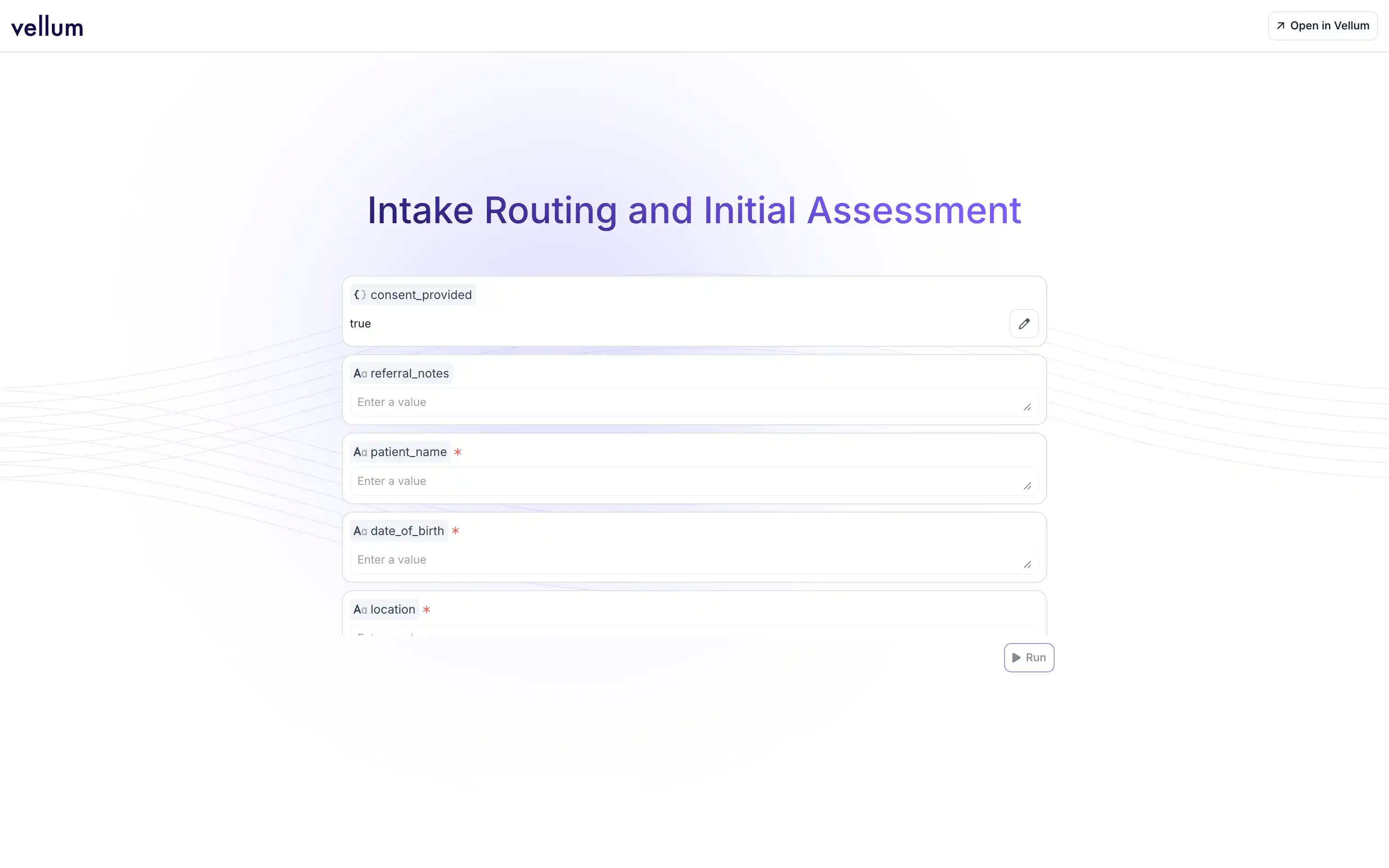
Vellum automatically analyzes your workflow and generates an AI App UI for your deployed Workflow. In this UI,  you'll see all  the required input fields that match your Workflow’s parameters, text inputs, numerical values, file uploads, and other data types..

When you hit Run, Vellum calls the same APIs your production environment does, and the results are streamed in realtime. The result is an interactive and simple to use AI app, that was built in a fraction of second.
Key capabilities

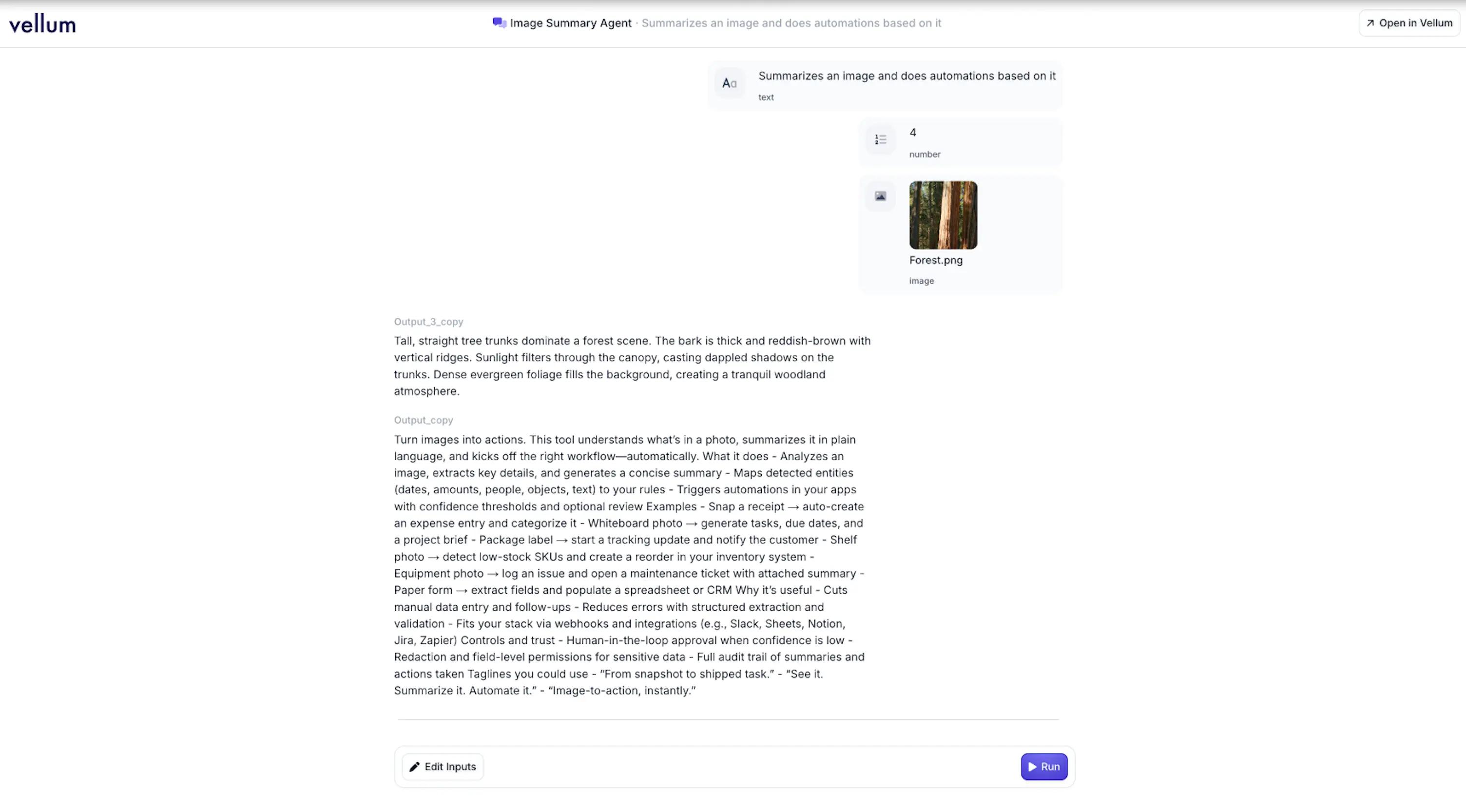
  • Intuitive input interface: Input forms are auto-generated to match your Workflow, including text fields, numbers, file uploads, and more.
  • Real-time execution: Run Workflows with production-level reliability and watch outputs stream back as they’re generated.
  • Interactive testing flow: Edit inputs and re-run executions as many times as needed in the same session.
  • Seamless access points: Open an AI App from the Share Workflow modal or directly from your Deployments overview.

Feature overview

Capabilities What It Does Why It Helps
Auto-generated App Interface Vellum auto-generates clean fields for text, numbers, file uploads, and more. Anyone can test a Workflow without writing code or setting up API calls.
Real-Time Execution Runs Workflows with production reliability and streams output as it’s generated. Validates behavior instantly and mirrors what happens in production.
Interactive Testing Flow Edit inputs and re-run executions within the same session. Speeds up iteration cycles and makes debugging frictionless.
Seamless Access Points Launch AI Apps from the Share Workflow modal or the Deployments overview page. Quick entry for both developers and non-technical teammates.
Production-Grade Accuracy Executes against the same Vellum APIs that power live integrations. Ensures results match real-world execution, not mock data.
Collaboration Ready Share the AI App UI link with teammates and stakeholders. Makes testing and demos accessible across your organization.

How to access AI Apps

There are two ways to open an AI App in Vellum:

1. Share Workflow Button – From any deployed Workflow, click the Share button to reveal both the AI App link and traditional read-only options.
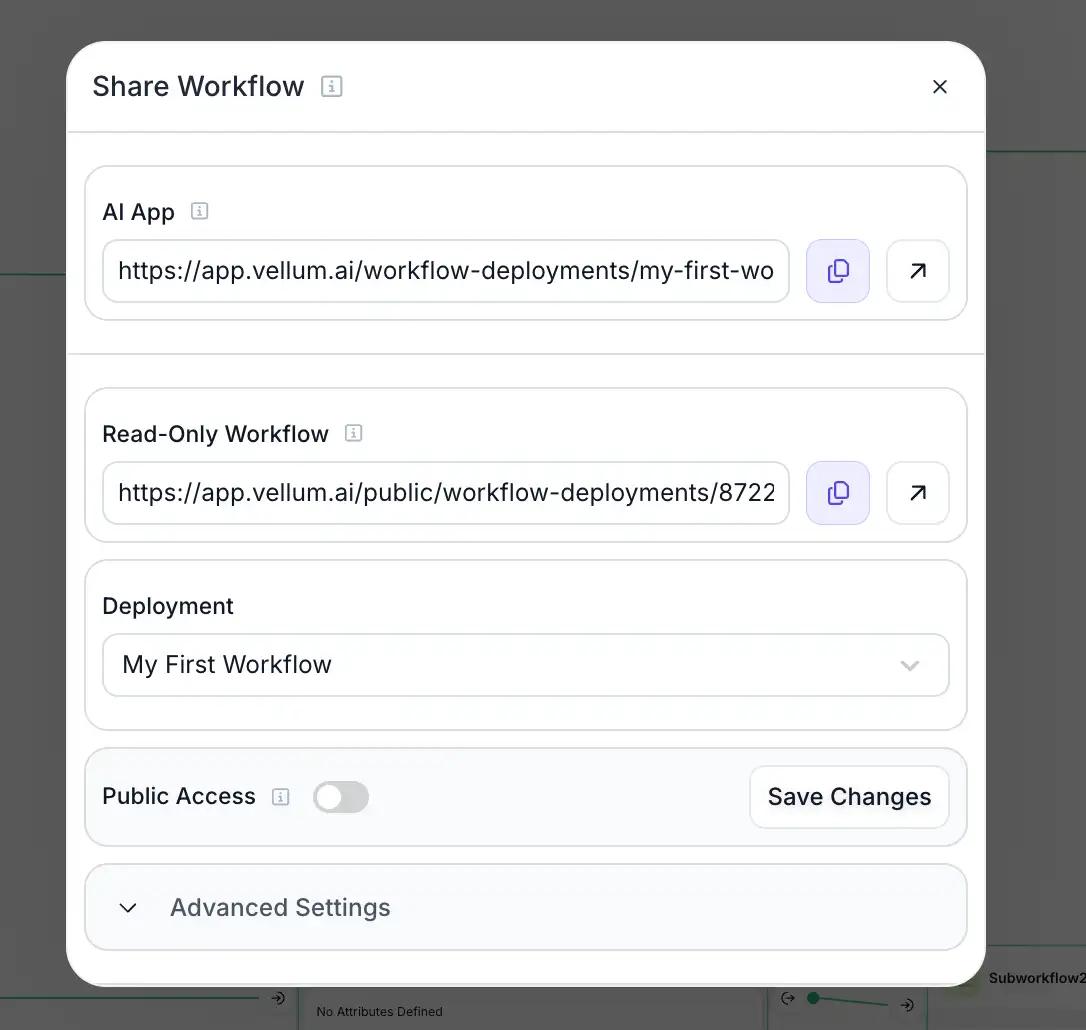
2. Deployments Overview – Visit the Deployments page and open the AI App directly from the Workflow card.

Now, everyone can build their AI apps

We built AI Apps to help everyone on your team to become AI native, faster. The powerful Workflows you create in Vellum shouldn’t be gated by engineering’s bandwidth, they should be accessible and usable across the whole org. This is a step forward to help the organizations using Vellum to become truly AI-native.

  • Developers can rapidly test logic changes, fine-tune prompts, and debug without juggling API calls or external apps
  • Product, Ops & Business teams can validate automations against real data, ensuring processes run smoothly before they go live.
  • Leaders & Stakeholders can interact with Workflows firsthand, gaining clarity and confidence in how AI is shaping business operations.
  • Internal teams can use AI Apps as powerful AI tools for day-to-day work, without needing a custom UI or API integration.

AI Apps are just the beginning of making Workflows accessible across every corner of your organization. We’re excited to keep building on this foundation, and can’t wait to see how your teams put AI Apps to work.

Read the full documentation here: Agent App Docs

FAQs

1. What are AI Apps in Vellum?

AI Apps are interactive, no-code interfaces automatically generated for any deployed Workflow in Vellum. They let you run, test, and share Workflows directly in the platform without needing custom code or external tools.

2. How do AI Apps differ from using the API directly?

While the API gives developers full control for integrations, AI Apps provide a ready-made interface for testing, demos, and everyday internal use. Both hit the same production-grade APIs under the hood, so results are identical.

3. Who can use AI Apps inside my organization?

You can enable anyone in your org with access to your Workflow’s App with a sharable link. This makes Workflow testing and usage collaborative instead of developer-only.

4. Can AI Apps be shared outside of my organization?

Yes, you can share any AI App through the AI App link. Fetch the link by pressing the “Share” button in Workflows or the AI App link present in the deployments window.

5. What types of inputs are supported in AI Apps?

AI Apps support any input available in your workflow. It auto-generates input fields based on your Workflow to make it easy to populate input fields and replicate production conditions when testing.

6. How do AI Apps support internal tooling?

Teams can internally use AI Apps as powerful AI agents or automations for all sorts of tasks like document analysis, reporting, content generation, etc. This avoids the need to build a custom UI or integrate with another system just to use the Workflow.

7. Do AI Apps cost extra to use?

No. Running a Workflow through an AI App consumes the same credits/resources as running it through the API. There are no additional fees for using the AI App interface itself.

8. How do I get started with AI Apps today?

Simply deploy a Workflow in Vellum. From the Deployments page or the Share button in Workflows, use the link to open the AI App. You’ll instantly see a ready-to-use interface.

Extra Resources

Ready to launch AI Apps in Vellum?

Start free today and see how AI Apps make your deployed Workflows instantly usable across your organization—with no code and real-time execution.

Get started with Vellum free →

ABOUT THE AUTHOR
Nicolas Zeeb
Technical Content Lead

Nick is Vellum’s technical content lead, writing about practical ways to use both voice and text-based agents at work. He has hands-on experience automating repetitive workflows so teams can focus on higher-value work.

ABOUT THE reviewer
Anita Kirkovska
Founding Growth Lead

An AI expert with a strong ML background, specializing in GenAI and LLM education. A former Fulbright scholar, she leads Growth and Education at Vellum, helping companies build and scale AI products. She conducts LLM evaluations and writes extensively on AI best practices, empowering business leaders to drive effective AI adoption.

No items found.
lAST UPDATED
Sep 24, 2025
share post
Expert verified
Related Posts
Model Comparisons
February 6, 2026
10 min
Claude Opus 4.6 Benchmarks
LLM basics
February 5, 2026
12 min
15 Best Make Alternatives: Reviewed & Compared
Product Updates
February 3, 2026
5 min
Vellum Product Update | January
LLM basics
January 30, 2026
20 min
15 Best Zapier Alternatives: Reviewed & Compared
LLM basics
January 28, 2026
20 min
2026 Marketer's Guide to AI Agents for Marketing Operations
LLM basics
January 26, 2026
18 min
Top 20 AI Agent Builder Platforms (Complete 2026 Guide)
The Best AI Tips — Direct To Your Inbox

Latest AI news, tips, and techniques

Specific tips for Your AI use cases

No spam

Oops! Something went wrong while submitting the form.

Each issue is packed with valuable resources, tools, and insights that help us stay ahead in AI development. We've discovered strategies and frameworks that boosted our efficiency by 30%, making it a must-read for anyone in the field.

Marina Trajkovska
Head of Engineering

This is just a great newsletter. The content is so helpful, even when I’m busy I read them.

Jeremy Hicks
Solutions Architect
Thank you! Your submission has been received!
Oops! Something went wrong while submitting the form.
Build AI agents in minutes with Vellum
Build agents that take on the busywork and free up hundreds of hours. No coding needed, just start creating.

General CTA component, Use {{general-cta}}

Build AI agents in minutes with Vellum
Build agents that take on the busywork and free up hundreds of hours. No coding needed, just start creating.

General CTA component  [For enterprise], Use {{general-cta-enterprise}}

The best AI agent platform for enterprises
Production-grade rigor in one platform: prompt builder, agent sandbox, and built-in evals and monitoring so your whole org can go AI native.

[Dynamic] Ebook CTA component using the Ebook CMS filtered by name of ebook.
Use {{ebook-cta}} and add a Ebook reference in the article

Thank you!
Your submission has been received!
Oops! Something went wrong while submitting the form.
Button Text

LLM leaderboard CTA component. Use {{llm-cta}}

Check our LLM leaderboard
Compare all open-source and proprietary model across different tasks like coding, math, reasoning and others.

Case study CTA component (ROI) = {{roi-cta}}

40% cost reduction on AI investment
Learn how Drata’s team uses Vellum and moves fast with AI initiatives, without sacrificing accuracy and security.

Case study CTA component (cutting eng overhead) = {{coursemojo-cta}}

6+ months on engineering time saved
Learn how CourseMojo uses Vellum to enable their domain experts to collaborate on AI initiatives, reaching 10x of business growth without expanding the engineering team.

Case study CTA component (Time to value) = {{time-cta}}

100x faster time to deployment for AI agents
See how RelyHealth uses Vellum to deliver hundreds of custom healthcare agents with the speed customers expect and the reliability healthcare demands.

[Dynamic] Guide CTA component using Blog Post CMS, filtering on Guides’ names

100x faster time to deployment for AI agents
See how RelyHealth uses Vellum to deliver hundreds of custom healthcare agents with the speed customers expect and the reliability healthcare demands.
New CTA
Sorts the trigger and email categories

Dynamic template box for healthcare, Use {{healthcare}}

Start with some of these healthcare examples

Claims compliance review agent
Examines claim submissions for compliance and recommends corrections
Clinical trial matchmaker
Match patients to relevant clinical trials based on EHR.

Dynamic template box for insurance, Use {{insurance}}

Start with some of these insurance examples

Insurance claims automation agent
Collect and analyze claim information, assess risk and verify policy details.
AI agent for claims review
Review healthcare claims, detect anomalies and benchmark pricing.
Agent that summarizes lengthy reports (PDF -> Summary)
Summarize all kinds of PDFs into easily digestible summaries.

Dynamic template box for eCommerce, Use {{ecommerce}}

Start with some of these eCommerce examples

E-commerce shopping agent
Check order status, manage shopping carts and process returns.

Dynamic template box for Marketing, Use {{marketing}}

Start with some of these marketing examples

SEO article generator
Generates SEO optimized articles by researching top results, extracting themes, and writing content ready to publish.
Synthetic Dataset Generator
Generate a synthetic dataset for testing your AI engineered logic.

Dynamic template box for Sales, Use {{sales}}

Start with some of these sales examples

Objection capture agent for sales calls
Take call transcripts, extract objections, and update the associated Hubspot contact record.
Active deals health check agent
Sends a weekly HubSpot deal health update, ranks deals and enables the sales team.

Dynamic template box for Legal, Use {{legal}}

Start with some of these legal examples

Contract review agent
Reviews contract text against a checklist, flags deviations, scores risk, and produces a lawyer friendly summary.
PDF Data Extraction to CSV
Extract unstructured data (PDF) into a structured format (CSV).

Dynamic template box for Supply Chain/Logistics, Use {{supply}}

Start with some of these supply chain examples

Risk assessment agent for supply chain operations
Comprehensive risk assessment for suppliers based on various data inputs.

Dynamic template box for Edtech, Use {{edtech}}

Start with some of these edtech examples

No items found.

Dynamic template box for Compliance, Use {{compliance}}

Start with some of these compliance examples

No items found.

Dynamic template box for Customer Support, Use {{customer}}

Start with some of these customer support examples

Renewal tracker agent
Create an agent that scans HubSpot for deals with upcoming renewal dates in the next 60 days.
Customer support agent
Support chatbot that classifies user messages and escalates to a human when needed.

Template box, 2 random templates, Use {{templates}}

Start with some of these agents

Insurance claims automation agent
Collect and analyze claim information, assess risk and verify policy details.
Claims compliance review agent
Examines claim submissions for compliance and recommends corrections

Template box, 6 random templates, Use {{templates-plus}}

Build AI agents in minutes

Insurance claims automation agent
Collect and analyze claim information, assess risk and verify policy details.
AI agent for claims review
Review healthcare claims, detect anomalies and benchmark pricing.
Retail pricing optimizer agent
Analyze product data and market conditions and recommend pricing strategies.
LinkedIn Content Planning Agent
Create a 30-day Linkedin content plan based on your goals and target audience.
Claims compliance review agent
Examines claim submissions for compliance and recommends corrections
PDF Data Extraction to CSV
Extract unstructured data (PDF) into a structured format (CSV).

Build AI agents in minutes for

{{industry_name}}

Roadmap planner
Agent that reviews your roadmap and suggests changes based on team capacity.
Account monitoring agent
Combines product usage data with CRM data from HubSpot or Salesforce to flag accounts with declining usage, especially ahead of renewals.
Cross team status updates
Scans Linear for stale, blocked, or repeatedly reopened issues, flags patterns, and uses Devin to propose cleanup or refactor suggestions.
SEO article generator
Generates SEO optimized articles by researching top results, extracting themes, and writing content ready to publish.
Stripe transaction review agent
Analyzes recent Stripe transactions for suspicious patterns, flags potential fraud, posts a summary in Slack.
KYC compliance agent
Automates KYC checks by reviewing customer documents stored in HubSpot

Case study results overview (usually added at top of case study)

What we did:

1-click

This is some text inside of a div block.

28,000+

Separate vector databases managed per tenant.

100+

Real-world eval tests run before every release.