

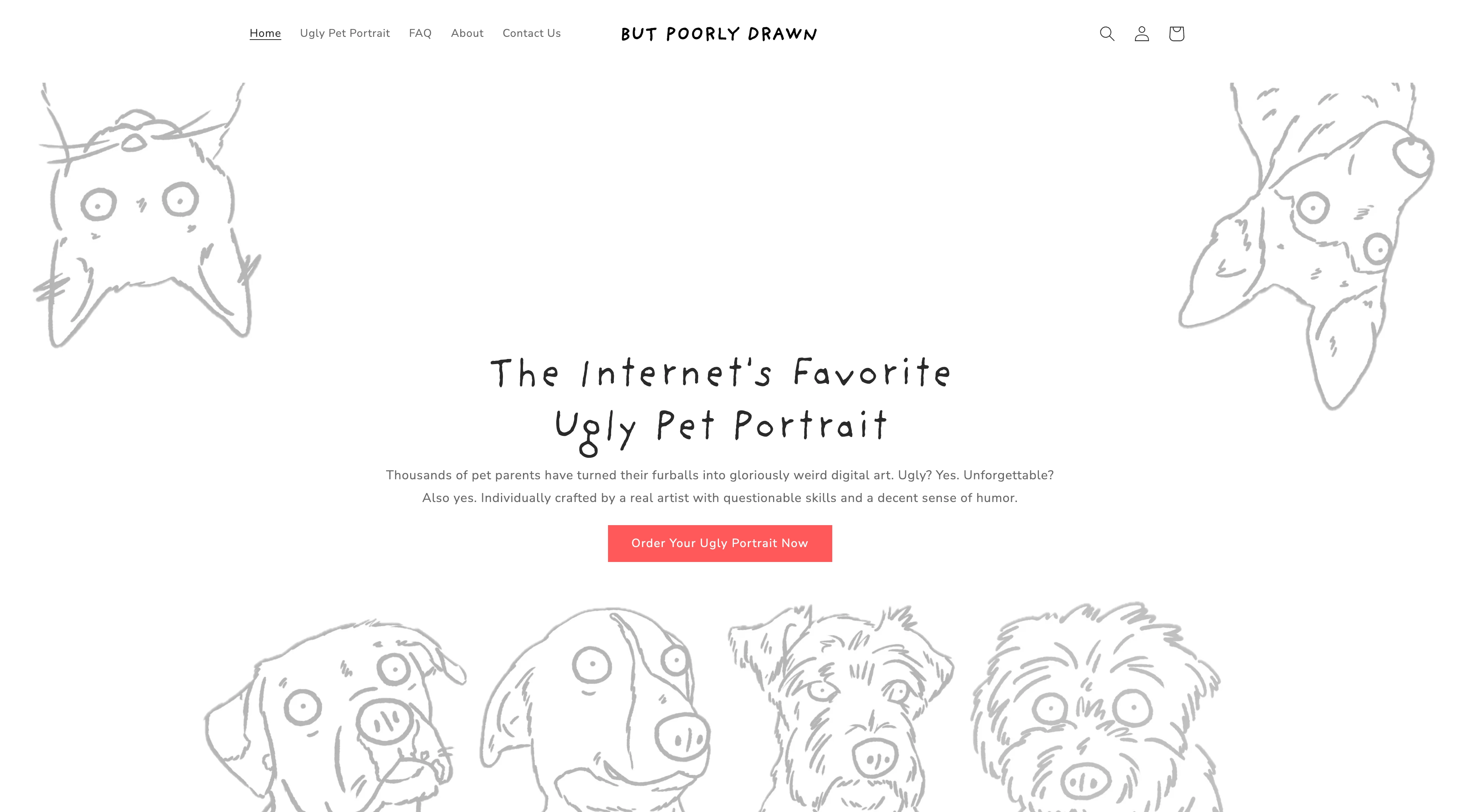
Max is a solo entrepreneur who runs a Shopify store that sells ugly custom pet portraits. But Poorly Drawn features portraits that customers buy as cute gifts and mementos of their pets.
He built the business in 2020, drawing every portrait by hand, and over five years he has done thousands of them. Today the store moves around 200 orders a day, with Max handling the whole operation.
After scaling order fulfillment with AI, Max needed extra support to handle the most time consuming and repetitive task taking him away from the things that mattered: customer service.
Quick overview
- Max runs But Poorly Drawn, a solo Shopify store selling custom pet portraits, handling around 200 orders a day on his own.
- Customer support email was the repetitive task eating his time, so he built a Vellum assistant named Lucy to handle it.
- He found Vellum through a Vellum article on alternatives to OpenClaw and Hermes while researching agent frameworks.
- Lucy reads each support email and drafts an on-brand reply in Slack, and Max approves the final send, turning support into a few minutes twice a day.
- Where it is heading: Lucy watching his order-fulfillment app, then acting as an orchestrator that hands work to sub-agents across fulfillment, marketing, and content.
Drowning in customer support
Max wanted his time back for the work that actually grows the business: improving the product, building an order-fulfillment app, and planning what comes next. Support email was a reactive, repetitive, and impossible to ignore task that took away from Max's higher value work.
Tired of answering customer support emails by hand, Max searched for an AI tool that he could use to scale this and other processes after.
An AI assistant made perfect sense for him to implement to automate this process, but had a constraint a lot of technical solo-preneurs will recognize. He has a programming background and is not afraid of the command line, but he did not want to live there. He did not want a dozen terminal tabs open, a pile of scripts to maintain, and a separate window for every running task. He wanted one assistant with an interface that just handled this with enough trust to let it run by itself.
The solution was a Vellum assistant.
Max chose Vellum
Max is technical enough to have used any ai assistant tool out there. He considered the developer-focused agent frameworks people were talking about (OpenClaw, Hermes, etc.) and made a practical call.
Most open-source agents came with setup friction he did not want to take on. He had seen enough of the troubles Openclaw and Hermes users had with the configuration involved to know it was not how he wanted to spend his precious time. That research is also how he found Vellum: while comparing agent harnesses, he came across a Vellum article covering alternatives to those frameworks and decided to try it. He considered one of the more capable multi-agent frameworks specifically because he knew he wanted to scale his AI application past customer support, but felt that a centralized AI Assistant that can spin up subagents as tasks scale was a better route.
His initial goal was to jumpstart getting his assistant up and solving real problems the same day. Once it's successfully running one task, expanding to other areas of his business like marketing and infrastructure that will benefit from automation became the end goal. Avoiding the CLI, Max also needed this agent to have an easy to use interface. In the end he chose the option that was fast and easy to set up, without sacrificing the allowance of technical depth that most agents had to refine and scale automation across the business.
Max found his solution in Vellum:
- A native desktop app, web app, and iOS app with an interface built for daily use, no terminal required
- Same-day setup, with his assistant running customer support within hours of starting
- A skills system that lets him expand into marketing, fulfillment, and beyond without rebuilding from scratch
- Persistent memory that compounds over time, so his assistant knows the business better the longer it runs
- Multi-agent architecture with the headroom to orchestrate several assistants in parallel once he's ready to scale
Meet his assistant Lucy
He named his assistant Lucy. Setting her up to run customer service took about a day. He wanted a way for Lucy to handle 90% of the work, requiring his input at the very end to ensure his customers always had a helpful response. A customer support system with Max as the human in the loop, here's how it works.
When a customer emails the store, Lucy reads it through the email account's API, figures out what the customer is actually asking, and posts a message in Slack that summarizes the request and includes a suggested reply written in the store's brand voice.
Max opens Slack, reads the summary, and if the draft is good he sends it with one click. If it needs a tweak, he tweaks it. Then he closes Slack and goes back to his real work.
The rules that keep Lucy on-brand live in Notion. Max keeps a running document of customer-service do's and don'ts, the policies, tone, and edge cases for Lucy pull from. When something new comes up, he does not reprogram anything. He edits the document and the loop improves.
The result is that he checks Slack maybe twice a day instead of refreshing his inbox all day. The repetitive work is handled. The judgment call, the actual hitting of send, stays with him. That last part matters, and we will come back to it.
Time back to grow But Poorly Drawn
Customer service used to be a constant pull on Max's attention throughout the day. Now it takes a few minutes, twice a day, and the hours he got back go straight into the work that actually grows But Poorly Drawn: improving the product, building his order-fulfillment app, and planning what comes next. The repetitive work got automated. The judgment stayed with him.
Customer service was only the first job. Once the fulfillment app ships, Max wants Lucy watching it, catching bugs and production issues before customers do. Past that, the end state he describes is Lucy as an orchestrator: he gives her one task and she hands the work to sub-agents covering different areas of the business. Fulfillment, marketing, content. The support desk was just the start.
The mission is for Lucy to quietly run the back office, so that he can stay focused building the business.
How to build this yourself
Max's setup is specific to But Poorly Drawn, but the pattern works for any operation buried in repetitive support email. Here is the shape of it.
- Connect your inbox: Give your assistant read access to the email account support comes into. Max uses Zoho. Gmail, Outlook, or anything with an API works the same way.
- Connect where you want to be notified: Max routes everything to Slack so support lives in one channel instead of his inbox. This is also where the human-in-the-loop step happens.
- Write your rules down in one place: Put your policies, your tone, your common answers, and your hard nos in a single document. Max uses Notion. This is the brain of the operation, and the better it is, the better every reply gets.
- Set the loop: New email arrives, the assistant reads it, summarizes the ask, and drafts a reply that follows your rules and sounds like your brand. The draft lands wherever you chose in step two.
- Keep yourself on the send button: Review the draft, send or edit, move on. Over time, as you trust the drafts, you check less often. You are tuning a document, not writing code.
Main takeaway
Max's setup is one example of a simple pattern: write down your rules, let an assistant handle the repetition, keep yourself on the final call. It is less a software project and more a workflow you assemble in an afternoon, and it works whether you sell pet portraits, consulting hours, or software.
Max got into this to make pet portraits, not to answer the same email a hundred times a week. Lucy gave him that back. The orders keep coming, he just stopped having to babysit the inbox behind them.
That is the quiet promise of a personal AI assistant for a one-person business. It takes the repetitive layer off your plate so you can spend your hours on the work only you can do.
Max found this in Vellum. If your inbox is running your day, start on Vellum for free today!
FAQs
How do I automate customer support as a solo business owner?
Connect your support inbox to an AI assistant, like Vellum, give it a document of your policies and tone, and have it draft replies for you to approve. The setup Max uses routes a summary and a suggested reply into Slack, where he reviews and sends with one click. You stay on the final send, so customers still get your voice and your judgment.
Can I automate email responses without letting AI reply to customers on its own?
Yes, and for most small businesses that is the right call. The pattern here keeps a human on the send button. The assistant reads the email, drafts a reply that follows your rules, and waits for you to approve it. You get the time savings of automation without handing your customer relationships to a bot.
How long does it take to set up?
Max had his Vellum assistant running customer service in about a day. Most of the work is not technical. It is writing down your policies and common answers clearly so the assistant has good rules to follow. The connections to email, Slack, and a notes app take minutes.
What tools do I need?
An email account with an API, somewhere to review drafts, and a place to store your rules. In this example that is Zoho for email, Slack for review, and Notion for the rules document, all connected to a Vellum assistant. The specific apps are flexible. The pattern is what matters.
Will it sound like my brand or like a robot?
It sounds like whatever you write down. Because the replies are generated from your own rules-and-tone document, the assistant matches your brand voice, and you can fine-tune it any time by editing that document. Every reply is also reviewed by you before it goes out, so nothing off-brand reaches a customer.
Does this only work for Shopify stores?
No. The store here is on Shopify, but the workflow is just email in, draft out, human approves. Any small business buried in repetitive support email can run the same loop, whether you sell products, services, or software.
Do I need to know how to code to set this up?
No. The setup is connecting accounts and writing your rules in plain English. The hardest part is being clear about your policies and tone, which is writing work, anyone who can run a business can do it. When something needs to change, you edit a document, you do not touch code.
What is the difference between an AI assistant and a customer service chatbot?
A chatbot sits on your website and answers from a script, and customers usually know they are talking to one. A personal AI assistant like Vellum works your actual inbox: it reads each email, understands what the customer wants, and drafts a reply in your voice for you to approve. The customer gets a real email from your address, written the way you would write it.
How do I keep the AI from sending wrong answers to customers?
Two safeguards. First, the assistant drafts from your own rules document, so it answers from your policies instead of guessing. Second, you review every reply before it goes out. If a draft misses, you fix the document and the next one reflects the change. Wrong answers become edits, never incidents.
Can the same assistant take on tasks beyond customer support?
Yes. Support is a common first job because the pain is daily and the loop is simple, but an assistant like Vellum can pick up new areas as you trust it. Max is already planning to have his assistant monitor his order-fulfillment app and eventually hand off work to sub-agents across marketing and content.
What is human-in-the-loop customer service automation?
It means the AI does the repetitive work, reading, triaging, and drafting, while a person makes the final call on what gets sent. It is the difference between automating your support and outsourcing it. For a small business, it delivers most of the time savings while keeping you in charge of every word a customer sees.
Extra Resources
What Can a Personal AI Assistant Actually Do? (2026) →
10 Best AI Assistants for Automating Your Work in 2026 →
10 Best AI Assistants for Email, Calendar, and Slack in 2026 →
