Viktor is an AI employee that lives in Slack and Microsoft Teams, connects to 3,200+ tools, and does actual work: reports, dashboards, code, and campaigns. That team-coworker model is a genuinely different shape from most AI assistants, and it's worth understanding before you decide whether it's the right tool for you.
This breakdown covers what Viktor actually is, how it works, what it costs, where it's strong, where it falls short, and which alternatives are worth considering if it doesn't fit your needs. It draws on the official site, security documentation, and public product material to cover both sides fairly.
What Is Viktor?
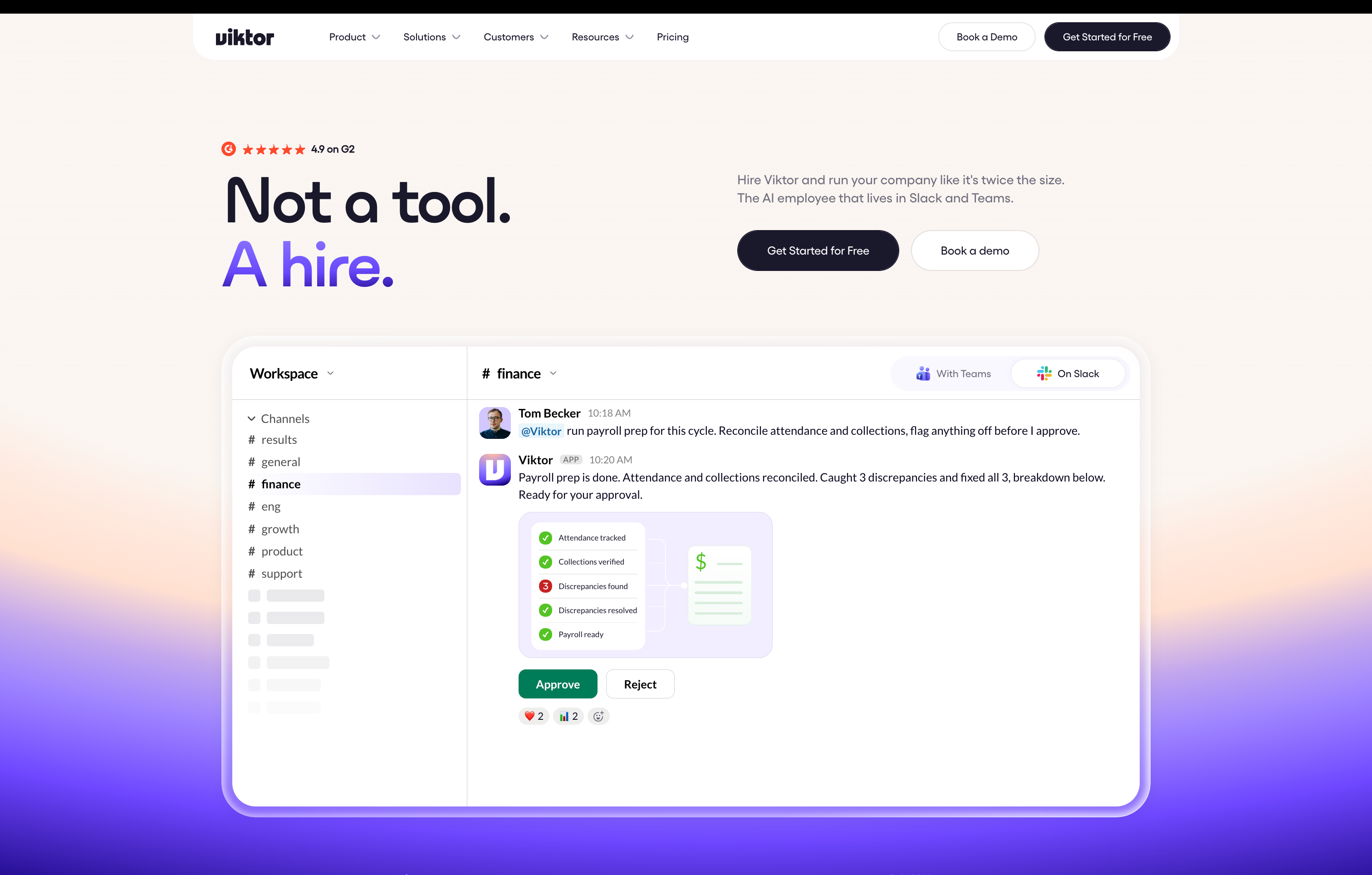
Viktor is an AI employee built for teams that already live in Slack or Microsoft Teams. The positioning is deliberate: "Not a tool. A hire." You install it from the Slack App Directory or Teams, connect your tools, and talk to it like a colleague. Instead of answering questions, it executes tasks: pulling data from Stripe, building a revenue dashboard, auditing ad spend, opening pull requests, or assembling an investor update.
Viktor is operated by Zeta Labs, formerly known as Jace AI. The company raised a Series A in May 2026 backed by Accel, NFDG, and others. The product now claims 50,000+ teams and 3,200+ tool integrations, with customers like True Classic, Ridge, and Hampton.
If you've used ChatGPT or Claude and assumed Viktor is the same thing with a Slack wrapper, that's not what it is. Viktor has its own cloud computer where it writes and runs code to complete tasks. It delivers finished outputs: PDFs, spreadsheets, deployed web apps, and pull requests. The model is closer to hiring an analyst than subscribing to a chatbot.
How Viktor Works
Each Viktor instance runs as a shared team assistant inside your Slack or Microsoft Teams workspace. You install it from the app directory, connect your tools (Stripe, Notion, Google Ads, HubSpot, Linear, Salesforce, and 3,200+ others), and then talk to @Viktor in any channel or DM.
A few things about this architecture matter:
- Shared workspace context. One Viktor instance serves your entire team. All connected integrations are shared across every team member. Anyone in the workspace can mention @Viktor and it has context from public channels and DMs to be helpful.
- Cloud-based execution. Viktor has its own computer in the cloud where it writes and runs code. It queries your connected tools, analyzes data, and delivers real outputs.
- Recurring tasks and schedules. Viktor can run workflows on autopilot: morning revenue reports, weekly ad audits, monthly investor updates. It also proposes automations you didn't think to ask for.
- 3,200+ integrations. Salesforce, HubSpot, Linear, Notion, Jira, Stripe, GitHub, Google Drive, and more. If a tool isn't supported, Viktor can build a custom integration.
- Slack and Teams only. You talk to Viktor through Slack or Microsoft Teams. There is no native desktop app, no mobile app, no voice surface, and no email surface. Viktor works where your team works, but only if that place is Slack or Teams.
- Team-only model. Viktor is built for shared workspaces. It is not designed for individual use. Solo operators get team pricing and a team-oriented experience for a personal workflow problem.
Viktor Pricing and Access
How much does Viktor cost per month?
Viktor offers $100 in free credits with no credit card required and no sales call. When you need more, pricing starts at $50 per month. The model is credit-based: you pay for what Viktor executes, and the company says there is no markup on model costs.
The credit-based approach means costs scale with usage. A complex workflow can run hundreds of credits per execution. If you have ten automated reports running daily, the monthly credit burn can add up quickly. The next tier beyond the entry plan is enterprise pricing, which is custom.
You can't self-host Viktor. It runs on Viktor's cloud infrastructure. If running on your own servers matters to you, that's a structural limitation of the product.
Viktor Security and Privacy Controls
Is Viktor safe to use?
Viktor's security documentation covers the basics well. The product is SOC 2 Type 1 compliant (with Type 2 in progress), CASA Tier 3 certified, listed in the Slack App Directory after Slack's security review, and approved by Microsoft for Microsoft Teams. Data is encrypted in transit via TLS and at rest using industry-standard encryption. Viktor does not train external AI models on your data.
The real privacy gap is structural, not a missing certification. Viktor operates as a shared team assistant. All integrations are shared across your entire team. When you connect your email, every team member has access to it. Viktor has context from public channels and DMs across the workspace. The official FAQ recommends treating Viktor like a shared team resource and avoiding sensitive personal information in DMs.
Viktor's roadmap lists Private Mode, role-based access controls, per-user token scoping, and data retention controls as in development. None of these are shipped yet. If you need per-user privacy, isolated conversations, or individual OAuth connections today, Viktor doesn't offer them. The company offers a Clean Workspace option that wipes all stored data, but there is no granular per-user memory inspection, correction, or export.
What Viktor Does Well
- Team AI employee model. Viktor is purpose-built for teams that want an AI colleague in Slack or Teams. You talk to it like a coworker, and it handles cross-tool work across your stack. That framing resonates with SMB founders who want to delegate without hiring.
- 3,200+ integrations. The integration catalog is broad, covering Salesforce, HubSpot, Linear, Notion, Jira, Stripe, GitHub, Google Drive, and thousands more. Viktor can also build custom integrations for tools that aren't listed.
- Real execution, not text alone. Viktor delivers finished outputs: PDFs, spreadsheets, deployed web apps, pull requests, and dashboards. You're not copy-pasting from a chat window.
- Recurring tasks on autopilot. Scheduled reports, weekly audits, and monthly investor updates run without prompting. Viktor also proposes automations you didn't ask for.
- Role-specific use cases. Viktor organizes its capabilities by role: founders, marketing, engineering, and ops. Each role gets tailored workflows like ad spend audits, bug triage, or board pack assembly.
- Quick setup. Install from the app directory, connect tools, and start working. Viktor handles its own onboarding by introducing itself and asking what you need.
- Compliance posture. SOC 2 Type 1, CASA Tier 3, Slack security review, and Microsoft Teams approval. These are real certifications that matter for B2B teams.
Where Viktor Falls Short
- No self-hosting. Viktor runs on Viktor's cloud. If you need your assistant to run on your own infrastructure, Viktor doesn't offer that path.
- No per-user privacy. All integrations are shared across the team. DMs with Viktor are visible in shared workspace context. Private Mode is on the roadmap, not shipped. If privacy matters to how your team works, this is a structural gap.
- Slack and Teams only. There is no native desktop app, no mobile app, no voice surface, no email surface, and no web surface outside of Slack or Teams. You interact with Viktor where your team works, but only if that place is Slack or Teams.
- Credit pricing gets unpredictable at scale. The $50/month entry plan includes credits that can drain quickly with complex workflows. Ten automated reports a day can burn through a monthly allotment, and the next tier is custom enterprise pricing.
- Single provider lock-in. Viktor runs on its own models through its own infrastructure. You can't swap in Claude, GPT, Gemini, or a local model.
- No memory inspection or export. Viktor builds a knowledge base over time, but there's no way to inspect, correct, or export what it remembers about your team. The only option is a full Clean Workspace wipe.
- Team-only model. Viktor is built for shared workspaces. If you're an individual contributor or solo operator, you get team pricing and a team-oriented experience for a personal workflow problem.
- No open source option. Viktor is proprietary. If you want to audit, modify, or contribute to the code that runs your assistant, Viktor doesn't give you that access.
Key 2026 Trends in AI Agents
- Agents are entering enterprise software fast, but production is lagging. Gartner forecasts that 40% of enterprise applications will include task-specific AI agents by the end of 2026, up from less than 5% in 2025 [1]. Yet one analysis found that 80% of enterprise apps embed an AI agent while only 31% run one in production [2].
- Agent capability is improving, but failure is still material. The Stanford AI Index 2026 recorded agent success rates on real-world terminal tasks jumping from 20% in 2025 to 77.3% [3]. That's a big jump. It also means agents still fail about one in five times on structured tasks.
- Governance is the bottleneck. Deloitte's 2026 research found that only one in five companies has a mature governance model for autonomous AI agents [4]. The technology is outpacing the guardrails.
- Consumer mass adoption is arriving. An IEEE global study found that 52% of technology leaders see agentic AI reaching mass or near-mass consumer adoption as a personal assistant, scheduler, or family calendar manager in 2026 [5].
Who Should Consider Viktor?
- The Slack-native team: Your team already lives in Slack or Microsoft Teams and wants an AI that works where you already communicate. Viktor integrates directly into those platforms.
- The SMB founder delegating analyst work: You want to hand off ad spend audits, investor updates, and revenue reports without hiring. Viktor's role-specific workflows are built for this.
- The marketing team managing ad accounts: You need an AI that pulls spend data across Meta and Google Ads, flags underperformers, and drafts new copy. Viktor's marketing use cases are well-developed.
- The engineering team needing bug triage: You want an AI that monitors support channels, opens scoped tickets, and writes fixes on feature branches. Viktor's engineering workflows cover this.
Who Should Look at Alternatives?
- If privacy matters: All integrations are shared across your team. DMs with Viktor are visible in shared workspace context. Private Mode is on the roadmap, not shipped.
- If cost matters: Credit-based pricing can be unpredictable at scale. Complex workflows drain credits quickly, and the next tier beyond entry is custom enterprise pricing.
- If you want model choice: Viktor runs on its own models. You can't use Claude, GPT, Gemini, or local models.
- If you need multiple channels: Viktor works in Slack and Teams. No native app, no voice, no email, no phone, no web surface outside those platforms.
- If you want to self-host: Viktor is cloud-only. No self-hosting option exists.
- If you're an individual: Viktor is built for teams. Solo operators get team pricing and a shared-workspace experience for a personal workflow problem.
Best Viktor Alternatives (2026)
1. Vellum
Vellum is a personal AI assistant that runs as a native desktop app on your own device or in Vellum Cloud, with iOS, web, voice, email, Telegram, Slack, and phone surfaces all sharing one persistent memory.
Score: 100
Standout strengths:
- Eight types of structured memory that learn your patterns and carry context across every conversation and surface.
- Run it on your own device, in Vellum Cloud, or self-hosted. Same codebase, same data.
- Use Anthropic, OpenAI, Google, Fireworks, OpenRouter, or local models. You pick the model for the task.
- Permission controls that ask before sensitive actions. The default is to deny.
- One assistant across desktop, iOS, web, voice, email, Telegram, Slack, and phone. Start on one surface, pick up on another.
- A plugin and skill ecosystem that extends what the assistant can do without building a new app for every workflow.
- Free cloud hosting when you create an assistant. Paid plans upgrade the machine, compute, and storage.
Trade-offs:
- The assistant becomes more useful as it learns your context, so the first few conversations require some teaching before it starts anticipating.
- Usage-based credits apply to many actions beyond the included plan credits, so heavy users need to watch the meter.
Pricing: Free, Mighty $30/month, Super $100/month, and Ultra $200/month. Paid plans include credits, with additional usage charged separately. Self-hosting has no platform fee. Anyone who signs up and creates an assistant gets free cloud hosting, and subscriptions upgrade the hosted machine, compute, and storage.
Compared to Viktor: Vellum gives you a personal assistant that compounds context over time. Viktor gives you a team AI employee that executes tasks in Slack.
The differences come down to four things:
- Memory: Vellum has structured memory you can inspect and correct. Viktor builds a knowledge base but you can only wipe it, not inspect it.
- Deployment: Vellum runs on your device, cloud, or self-hosted. Viktor is cloud-only.
- Model choice: Vellum supports multiple providers including local. Viktor runs on its own models.
- Cost: Vellum starts free with plans from $30/month. Viktor starts at $50/month with credit-based pricing.
Viktor's team AI employee model is a real advantage for Slack-native teams. Vellum's advantage is everything around the work: memory, deployment, model choice, and cross-surface context. See the full side-by-side comparison.
2. ChatGPT Work as a Viktor Alternative
ChatGPT Work is OpenAI's agent surface for longer tasks, connected apps, local files, browser work, and scheduled jobs inside the ChatGPT ecosystem.
Score: 88
Pros:
- Familiar ChatGPT interface and broad ecosystem
- Research, file analysis, and deliverables in one place
- Connected apps and scheduled tasks
Cons:
- Cloud-only, no self-hosting
- Locked to OpenAI models
- No structured memory types
Compared to Viktor: ChatGPT Work is the better fit if you already live in ChatGPT and want research, file analysis, and finished deliverables in a familiar interface. Viktor offers a Slack-native team AI employee with 3,200+ integrations and role-specific workflows. ChatGPT Work emphasizes projects, connected apps, and scheduled tasks. Vellum ranks higher when deployment choice, structured memory, and provider independence matter more than ecosystem reach.
3. Claude Cowork as a Viktor Alternative
Claude Cowork is Anthropic's desktop agent for local files, folders, applications, and repeatable knowledge work.
Score: 82
Pros:
- Anthropic model quality
- Desktop-native workflow with local file access
- Works alongside you on your machine
Cons:
- Desktop-only, no cross-surface continuity
- Single provider (Anthropic)
- No self-hosting
Compared to Viktor: Claude Cowork is the better fit for desktop-based knowledge work where you want an agent working alongside you on your local machine. Viktor's Slack-native model means it works where your team communicates, but it has no desktop app. Cowork brings Anthropic's model quality and a desktop-native workflow. Vellum ranks higher when you need cross-surface continuity and deployment flexibility beyond a single desktop app.
4. Manus as a Viktor Alternative
Manus is a cloud-based autonomous AI agent that operates its own browser, executes multi-step tasks over days without constant supervision, and delivers real outputs: reports, research, code, and file management.
Score: 78
Pros:
- Autonomous execution over multi-day tasks
- Browser operation covers web-native tools without pre-built integrations
- Broad capability surface: research, writing, file management, coding
Cons:
- Cloud-only with credit-based pricing
- No structured memory
- No self-hosting
Compared to Viktor: Manus is the better fit for individual operators who need an autonomous agent that works through a browser over multiple days. Viktor is team-oriented and Slack-native with 3,200+ integrations. Manus is more individual-focused and reaches through a browser rather than pre-built connections. Vellum ranks higher when you need persistent personal context rather than a task-specific autonomous agent.
5. Lindy AI as a Viktor Alternative
Lindy AI is a personal AI assistant built around email, meetings, and recurring task automation. It delivers work over iMessage, email, and connected tools.
Score: 75
Pros:
- Works without Slack: primary interface is iMessage and email
- SOC 2 and HIPAA compliant today
- Strong for individual use with personal AI assistant model
Cons:
- No free tier; starts at $49.99/month
- Less integration breadth than Viktor's 3,200+
- No self-hosting
Compared to Viktor: Lindy AI is the right alternative for individual contributors and small teams that want the AI coworker experience without needing Slack. It handles email drafting, meeting prep, scheduling, and CRM updates well. Viktor is stronger for teams already living in Slack who need cross-tool reporting and code execution. Vellum ranks higher when you want deployment choice, model flexibility, and structured memory that Lindy doesn't offer.
Viktor Alternatives Comparison Table
| Tool | Best For | Architecture | Pricing | Open Source | Key Differentiator |
|---|---|---|---|---|---|
| Vellum | Persistent personal assistant with structured memory | Desktop, cloud, or self-hosted | Free to $200/mo | Yes (MIT) | ⭐ Persistent and inspectable memory, multi-provider, deployment choice, free cloud hosting |
| ChatGPT Work | Research and deliverables in ChatGPT | Cloud | $20 to $200/mo | No | Broad ecosystem reach and familiarity |
| Claude Cowork | Desktop knowledge work with local files | Desktop | Varies by plan | No | Anthropic model quality, desktop-native |
| Manus | Autonomous multi-day task execution | Cloud | Credit-based | No | Browser-based autonomous execution |
| Lindy AI | Email and meeting automation | Cloud | $49.99 to $199.99/mo | No | SOC 2 + HIPAA compliant, email-first |
Why Vellum Stands Out
Viktor does something genuinely different. The team AI employee model that lives in Slack and executes cross-tool work solves a real problem for SMB teams. If your team already lives in Slack and wants an AI colleague that delivers finished work, Viktor deserves serious consideration.
What Viktor can't give you is privacy, deployment control, and model choice. All integrations are shared across your team. You can't self-host it. You can't use a different model provider. Private Mode is on the roadmap, not shipped. Those are structural choices, not beta gaps that will close with time. If any of them matter to how you work, Viktor's architecture doesn't bend in that direction.
The architecture difference that matters is where the assistant lives and who controls it. Vellum runs on your own device, in Vellum Cloud, or self-hosted. You choose the model provider. You can run local models through Ollama for sensitive work. Memory is structured, inspectable, and correctable. The assistant has one identity across desktop, iOS, web, voice, email, Telegram, Slack, and phone. Viktor runs on Viktor's cloud, uses its own models, and reaches you through Slack or Microsoft Teams.
Vellum vs Viktor
Vellum gives you a personal assistant that compounds context over time. Viktor gives you a team AI employee that executes tasks in Slack. Vellum's cross-surface reach covers the communication side while keeping the memory, deployment control, and model choice Viktor doesn't offer.
Vellum vs ChatGPT Work
Vellum gives you deployment choice, provider flexibility, and structured memory. ChatGPT Work gives you the ChatGPT ecosystem, but you give up self-hosting, model choice, and memory transparency to get it.
Vellum vs Claude Cowork
Vellum carries context across every surface you use. Claude Cowork is desktop-native, so it works on one machine. Vellum works on one machine plus email, Slack, Telegram, phone, and web, with deployment and model choice Cowork doesn't offer.
Vellum vs Manus
Vellum persists personal context across every conversation and surface. Manus executes autonomous multi-day tasks but doesn't retain personal memory. Vellum gives you deployment choice, model flexibility, and structured memory that Manus doesn't offer.
Vellum vs Lindy AI
Vellum gives you deployment choice, model flexibility, and structured memory. Lindy AI gives you email-first automation with HIPAA compliance, but you give up self-hosting, model choice, and memory transparency to get it.
Get started with Vellum free →
FAQs
What is the best Viktor alternative in 2026?
Vellum is the best Viktor alternative in 2026 because it gives you structured memory that compounds context over time, deployment choice between your own device, cloud, and self-hosting, model flexibility across Anthropic, OpenAI, Google, and local providers, and one assistant across desktop, iOS, web, voice, email, Telegram, Slack, and phone. It also has a free tier, so you can start without the $50/month commitment Viktor requires.
What is Viktor?
Viktor is an AI employee that lives in Slack and Microsoft Teams. It has its own cloud computer where it writes and runs code to complete tasks. It connects to 3,200+ tools, delivers real outputs like reports, dashboards, and pull requests, and runs recurring workflows on autopilot. Vellum is a personal AI assistant that takes a different approach, focusing on structured memory, deployment choice, and cross-surface continuity rather than a shared team workspace.
How much does Viktor cost?
Viktor offers $100 in free credits with no credit card required, then starts at $50 per month with credit-based pricing. Complex workflows can drain credits quickly, and the next tier beyond entry is custom enterprise pricing. Vellum offers a free tier and plans starting at $30/month, with self-hosting available at no platform fee. If cost predictability matters, Vellum's tiered plans give you a clearer budget than Viktor's credit-based model.
Is Viktor free?
Viktor offers $100 in free credits, but after those credits are spent, it costs from $50/month. There is no permanent free tier. Vellum has a permanent free tier that lets you create an assistant and use it without a trial clock or credit meter running. If you want an assistant you can use long-term without paying, Vellum is the better choice.
Can I self-host Viktor?
No. Viktor runs on Viktor's cloud infrastructure, and no self-hosting is available. Vellum is MIT-licensed open source and supports self-hosting with the same codebase and data model as the managed cloud product. If running your assistant on your own infrastructure matters to you, Vellum is the clear choice.
Does Viktor work outside of Slack?
Viktor works in Slack and Microsoft Teams. There is no native desktop app, no mobile app, no voice surface, no email surface, and no web surface outside of those two platforms. Vellum works across desktop, iOS, web, voice, email, Telegram, Slack, and phone. If you need an assistant that reaches you through more than Slack or Teams, Vellum covers far more surfaces.
Is Viktor safe for my team's data?
Viktor is SOC 2 Type 1 compliant, CASA Tier 3 certified, and approved by both Slack and Microsoft. Data is encrypted in transit and at rest. However, all integrations are shared across your entire team, and DMs with Viktor exist in shared workspace context. Private Mode is on the roadmap, not shipped. Vellum gives you per-user isolated memory, permission controls that default to deny, and the option to run entirely on your own infrastructure. If per-user privacy matters, Vellum is the stronger option.
Can Viktor work while I'm offline?
Yes. Viktor runs on its own cloud computer, so it can complete scheduled tasks and recurring workflows regardless of whether you're online. Vellum's cloud hosting also keeps your assistant available across surfaces. Both can work in the background, but Vellum's architecture is designed around persistent personal context rather than a shared team workspace.
What is the best alternative to Viktor?
Vellum is the best alternative for people who want a personal AI assistant with structured memory, deployment choice, model flexibility, and cross-surface continuity. It offers a free tier, self-hosting, and support for multiple model providers including local models. If your primary need is a team AI employee in Slack, Viktor does that well. If you want an assistant that compounds context over time and gives you control over where it runs and which models it uses, Vellum is the stronger choice.
Can I use Viktor with Claude or GPT models?
No. Viktor runs on its own models through its own infrastructure. You cannot swap in Claude, GPT, Gemini, or a local model. Vellum supports Anthropic, OpenAI, Google Gemini, Fireworks, OpenRouter, and local models through Ollama, so you can route different tasks to different providers. If model choice matters to your workflow, Vellum is the better option.
Is Viktor open source?
No. Viktor is a proprietary product with no public source code. Vellum is MIT-licensed open source, with the full codebase available on GitHub. If you want to inspect, modify, or contribute to the code that runs your assistant, Vellum gives you that access. Viktor does not.
Is Viktor or Vellum better for teams?
Viktor is built specifically for teams that live in Slack or Microsoft Teams. Its shared workspace model, 3,200+ integrations, and role-specific workflows are designed for team delegation. Vellum works for both individuals and teams, with Slack as one of its surfaces alongside desktop, iOS, web, voice, email, Telegram, and phone. If your team lives in Slack and wants a shared AI employee, Viktor is a strong fit. If your team needs privacy, deployment choice, model flexibility, or reach beyond Slack, Vellum is the stronger choice.
Is Viktor or Vellum better for individuals?
Vellum is the better choice for individuals. It has a free tier, runs on your own device, and gives you one assistant across desktop, iOS, web, voice, email, Telegram, Slack, and phone. Viktor is built for teams, requires a Slack or Teams workspace, and shares all integrations across team members. If you're a solo operator, Vellum gives you a personal assistant without the team overhead.
Extra Resources
- What Can a Personal AI Assistant Actually Do? (2026) →
- How Vellum Remembers →
- How a Vice Mayor Juggling Four Jobs Built an AI Executive Assistant →
- How a 3x Founder Made His AI Chief of Staff with Vellum Assistant →
Citations
[1] Azumo. (2026). 60+ AI Agent Statistics for 2026: Adoption, ROI & Market Growth.
[2] Okhrem, P. (2026). Enterprise AI Agents Adoption Statistics 2026.
[3] Stanford HAI. (2026). 2026 AI Index Report.
[4] SQ Magazine. (2026). AI Agents Statistics 2026: Adoption, Market Size & ROI Data.
[5] IEEE. (2025). The Impact of Technology in 2026 and Beyond: an IEEE Global Study.