

Environments
Overview
An environment determines where your assistant runs. By default, assistants run in Vellum Cloud, our managed platform, so you can sign up and go without managing any infrastructure. If you'd rather host the runtime yourself, you can run it locally on your Mac or deploy it to your own GCP project or custom Linux host. The environment you select affects latency, availability, resource limits, and how much control you have over the underlying infrastructure.
The --remote flag picks where a hatch runs:
vellum hatch --remote <local | docker | vellum>Architecture
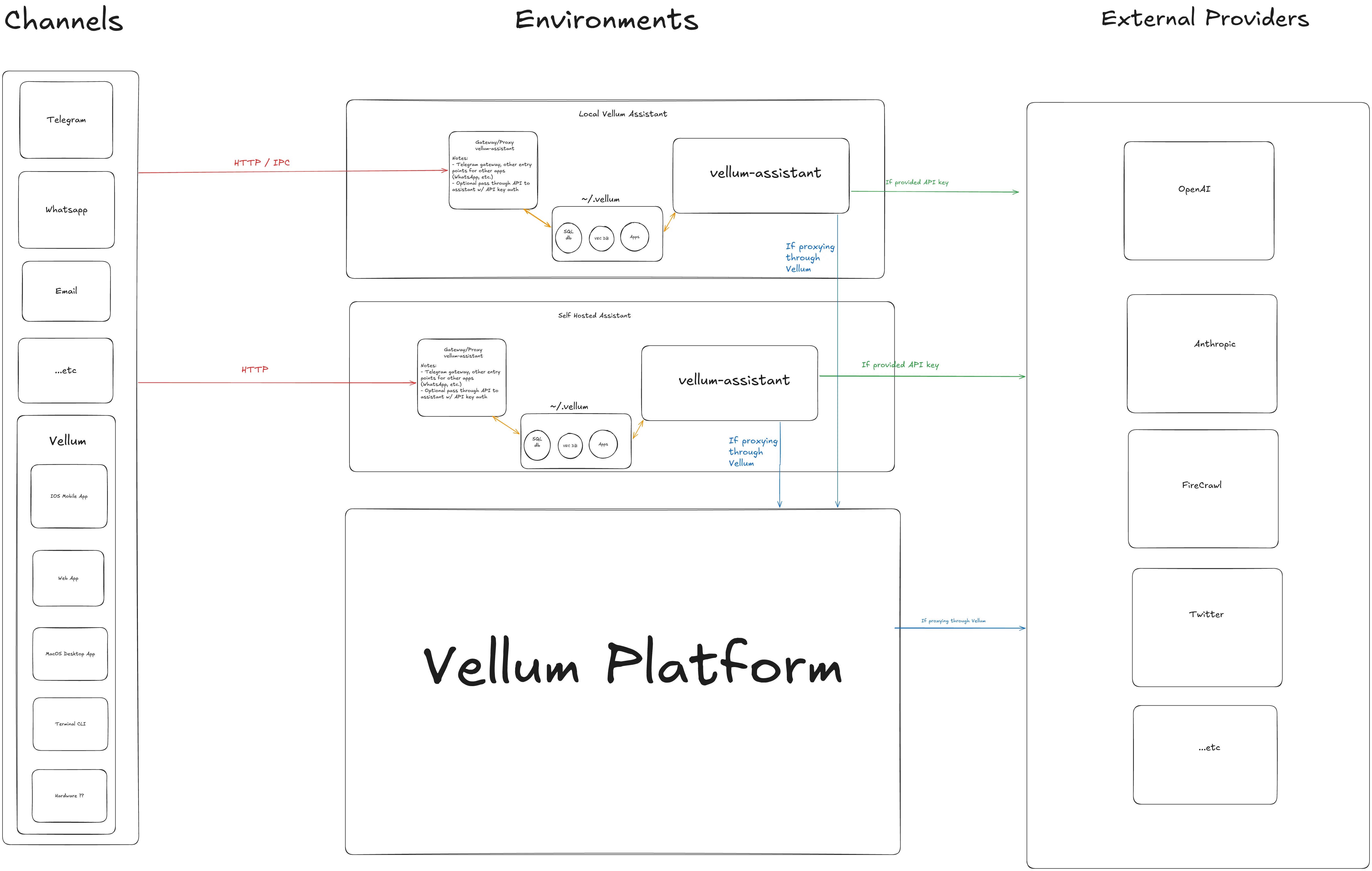
The following diagram shows how the different environments relate to channels and external providers:
Vellum Cloud (recommended)
Run your assistant on Vellum's managed platform. No cloud accounts or server management required, just sign up and go.
Vellum handles provisioning, upgrades, scaling, and infrastructure so you can focus on using your assistant. Managed assistants use Anthropic (Claude) as the default provider, billing is handled through your Vellum account, and your workspace is encrypted and isolated to you.
- Pros
- Zero setup, always-on, automatic upgrades, no infrastructure to manage. Reachable from web, desktop, mobile, voice, and chat channels.
- Cons
- No direct access to local files or tools on your machine without the desktop app. Provider selection is managed by Vellum.
Local
Run the assistant runtime on the same machine as the desktop app. Useful for development, testing, and privacy-sensitive use cases where you want everything on hardware you own.
vellum hatchWhen running locally, the assistant daemon and gateway both start on your machine. Latency is low and your assistant has direct access to local files and tools.
- Pros
- Low latency, full access to local files and tools, runs entirely on your hardware.
- Cons
- Tied to your machine being on. Uses local compute resources.
User Hosted
Run the assistant on infrastructure you control. This is useful when you need the assistant to stay running independently of your local machine, when you need more compute resources, or when you have specific compliance requirements. You create the machine, install Vellum on it, and hatch there.
GCP
A Compute Engine VM running the assistant runtime, in a project you own. GCP walks through provisioning the VM, installing Vellum, and reaching the assistant from your other devices.
Choosing an Environment
| Environment | Best For | Requires |
|---|---|---|
| Vellum Cloud | Most users. Zero-ops managed hosting, always-on, accessible from anywhere. | Vellum account |
| Local | Personal use, development, testing, privacy-sensitive workflows | Desktop app, vellum CLI |
| GCP | Always-on assistant on your own infrastructure | GCP account, gcloud CLI |
| Custom | On-premises, custom infra, any SSH host | SSH access to target machine |